


Skip to content

Household organizer

Keep the whole household in the loop.

The calendar, the shopping list, to-dos and chores, and where things are kept, on one plan everyone at home can see.

Nothing is added until you approve it.

Alder StreetARP

This week

Sept 7 to 13 · 7 items · shared with Alex, Grandma Ruth, Priya

Mon7
Labor Day, no schoolFrom the school packet
Tue8
First day of school8:10 · Door B · pickup 3:05
M
Soccer practice4:00 to 5:15 · Ridgeway Field, upper pitch
A
Wed9
Early dismissal1:50 · Grandma Ruth picks up
R
Thu10
Soccer practice4:00 to 5:15 · Priya drives
P
Fri11
Snack schedule sign-up closesFrom Coach Dana · Oct 3 is open
School packetCoach DanaHome
DrawerPilot7:00 AMToday3 items in today's overview.
Alder StreetARP

Find

Search by name, from any phone

beach towels
Extra beach towels
G5Garage · Upper right shelf

What a household tracks

The calendar, the shopping, the chores, and where things are.

Four things a household needs to know, in one place everyone you invite can see and update from their own phone.

Calendar

School days, practices, appointments, and deadlines on one shared week.

Alder StreetARP

This week

Sept 7 to 13 · 7 items · shared with Alex, Grandma Ruth, Priya

Mon7
Labor Day, no schoolFrom the school packet
Tue8
First day of school8:10 · Door B · pickup 3:05
M
Soccer practice4:00 to 5:15 · Ridgeway Field, upper pitch
A
Wed9
Early dismissal1:50 · Grandma Ruth picks up
R
Thu10
Soccer practice4:00 to 5:15 · Priya drives
P
Fri11
Snack schedule sign-up closesFrom Coach Dana · Oct 3 is open
School packetCoach DanaHome

Shopping list

Quantities and sizes on each item, grouped by store, checked off in the aisle.

Shopping · Shared list

What we need

Grouped by store. Check off in the aisle, then put away in the right spot.

Target3
24 glue sticks
School suppliesx2
Desk bin
3 composition notebooks
School suppliesx3
Desk bin
1 inch binder, blue
School suppliesx1
assign spot
+ 4 more items on the list

To-dos and chores

Tasks with a name on them, a due date or a repeat, and the spot they involve.

Tasks · Chore chart

This week

People down, days across. Tap a cell to mark it.

Mon
8
Tue
9
Wed
10
Thu
11
Fri
12
M
J
A
Due
Done
Missed

Where things are

Search for the thing and the answer is the spot, so anyone can find it and put it back.

Alder Street

What are you looking for?

Try gloves, charger, or keys

Maya’s cleats
Maya’s cleats
M2Mudroom / Lower bin
Soccer socks
M2Mudroom / Lower bin
Shin guards
M2Mudroom / Lower bin

How it works

Take a picture, a screenshot, or a file. DrawerPilot sorts it.

The school letter, the coach’s email, a photo of the supply list, or a picture of a shelf. DrawerPilot proposes what it finds, and nothing is added until you approve it.

  • Dates become events on the household calendar.
  • Deadlines and chores become to-dos with a name on them.
  • Supplies become a shopping list with quantities and sizes.
  • A photo of a shelf or a bin becomes a place things can be found and put back.
Maple Grove ElementaryGrade 3 · Ms. Alvarez · Room 14
Family Prep Sheet2026 to 2027 school year
Key dates
Meet the teacherThu, Sept 3, 4:00 to 5:30
First day of schoolTue, Sept 8
Curriculum nightThu, Sept 17, 6:30
Picture dayFri, Oct 2
Fall breakOct 12 to 13, no school
Grade 3 supply list
24 glue sticks
2 boxes of tissues
3 composition notebooks
1 inch binder, blue
Wired headphones
Pencil pouch
12 #2 pencils
Before the first day
Return the health form, by Aug 28
Sign the device agreement, online
Set up the lunch account, MySchoolBucks

Pickup is at 3:05 at Door B. Early dismissal every Wednesday at 1:50.

Questions: office@maplegrove.k12.examplePage 1 of 4
Alder StreetARP

Add to the plan

Drop a file or a photo, or paste text. DrawerPilot sorts it. You approve it.

Drop the prep sheet herePDF, photo, or pasted text
Nothing is added until you say so.
Nothing is added until you approve it.
Just launchedNew for Pro Users

Household memory

The details behind the family plan.

Notes and Contacts keep the useful context beside the calendar, tasks and things in your home. Save the school office, the electrician, pickup instructions and house routines, then find them when someone else needs to step in.

  • Extracted with uploads. A handout or screenshot can suggest an event, a contact and a useful note. You review each one before saving.
  • Ready for handoffs. Give an invited babysitter or grandparent the routines and household contacts they need.
  • Organized by home. Keep the notes and contacts for one house separate from another.

Optional Pro feature. Owner consent and feature availability are required. Nothing becomes shared household memory until you approve it.

Google Calendar

Connect Google Calendar and import a year of dates at once.

The annual school letter or the season schedule goes in once. DrawerPilot finds the dates, you review them, and the approved events go on the household calendar and to Google Calendar.

  • Connect once and choose which of your Google events the household sees.
  • Import a PDF, a photo, a screenshot, an .ics file, or pasted text.
  • Send the approved events to Google Calendar. Import the same file again and it lands on the same events.
Calendar · Import review

Review before adding

School calendar 2026–27.pdf · 34 dates found

School days and events

12 dates

Early dismissal days

6 dates

Breaks and holidays

9 dates

Parent meetings

7 dates · 2 possible duplicates

Nothing is added until you approve it. Add 27 events.

Email and push

Notifications at the times you choose.

A daily or weekly overview of what is on, a reminder before an event or a due task, and a push or email when someone assigns you a task. Each one is a row in Settings with a Push box, an Email box, and a time.

  • Daily and weekly overviews at the hour you pick, in your own time zone.
  • Reminders from 5 minutes to a day before an event, and up to a week before a task is due.
  • Every person in the household sets their own. Part of Pro.

How notifications work

Alder StreetAJ

What arrives

As they read in the app

DrawerPilot7:00 AMToday3 items in today's overview.
DrawerPilot7:00 AMToday, Thursday, October 22Events
  • 5:00 PM Soccer practice
Chores
  • Take the bins out, Jordan
Open tasks
  • Sort spare instruction manuals, Alex
Open DrawerPilot
DrawerPilot4:45 PMEvent coming upYou have an event starting soon.
Several changes close together arrive as one push with a count.
Hallway

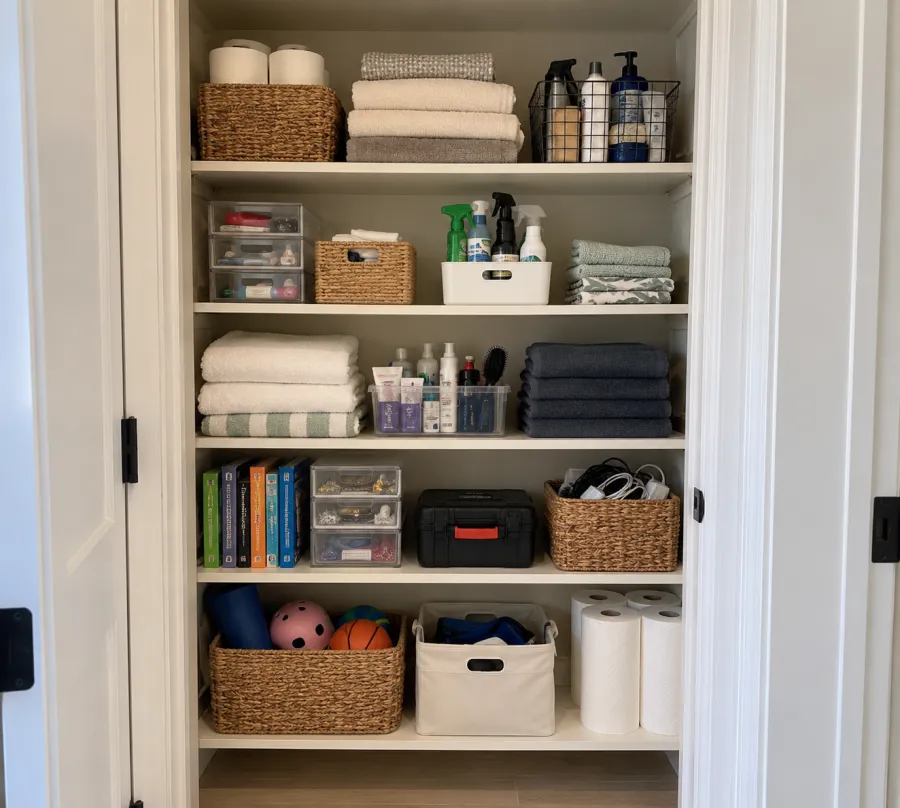
Scan a storage unit

One photo of the whole unit.

Photo of a hall closet with towels, baskets, and supplies on five shelves
Shelf MapOne photo of the closet

Scan the closet once. Find what you need later.

Take one photo of the whole closet, straight on. DrawerPilot draws a Shelf Map of every shelf and what is on it, and you check it before anything is saved.

  • One photo per closet. Every shelf, cubby, and drawer gets its own spot on the map.
  • Search for it later and the app opens on the exact shelf, highlighted.
  • Everyone in the household sees the same map, so anyone can put things back.

Pricing

Try Pro free for 14 days. Then $5 a month.

The trial lets the whole household try the smart features. After that it is $5 a month, or $50 a year, to keep everyone in sync. Free stays free for one person.

For one household

Free

$0for as long as you like

  • The calendar, the lists, the chores, and where everything lives
  • Drop in the packet and paste the coach’s email
  • AI features with a monthly limit, including 20 photo scans
  • One person signed in
For the whole household

Pro

$5a month after a 14-day free trial, or $50 a year

  • Everything in Free
  • Invite your partner, grandparents, and sitters
  • New Notes and Contacts for household memory
  • Unlimited AI scans, imports, and smart search
  • One plan covers the household. Nobody you invite pays.

Try DrawerPilot today.

Free to start. The 14-day Pro trial lets the whole household try the smart features, then it is $5 a month to keep everyone in sync.

Create your account